+86-13145827500 Charlie@elskyipc.com

Views: 0 Author: Site Editor Publish Time: 2026-08-13 Origin: Site
Consumer technology abandoned the serial port years ago. However, the B2B industrial reality looks very different. Factory floors rely heavily on these legacy interfaces. Industrial automation, older machinery, and PLC-driven environments depend entirely on serial ports. They require stable, real-time communication to function correctly.
You face significant risks when deploying standard consumer desktops in these spaces. Engineers often try bridging the gap using USB-to-serial adapters. This introduces immediate problems. You will encounter driver instability, frequent connection drops, and eventual hardware failures. Harsh manufacturing environments expose these fragile workarounds very quickly.
We built this guide to solve that exact problem. You will find a vendor-neutral, engineering-focused framework below. It helps you evaluate hardware objectively. You will learn how to shortlist a reliable industrial mini PC with COM ports. We focus on continuous performance, environmental resilience, and long-term lifecycle stability.
Native COM over Adapters: Native hardware serial ports prevent the latency and driver dropouts common with USB-to-COM converters.
Protocol Flexibility: Look for BIOS-configurable RS-232/422/485 ports to ensure compatibility across varied PLCs, CNCs, and sensors.
Environmental Baseline: A true fanless mini PC eliminates moving parts, drastically reducing MTBF (Mean Time Between Failures) in dusty, high-vibration settings.
Total Cost of Ownership (TCO): Upfront hardware costs are secondary to long-term lifecycle support (5–10 years) and minimal deployment downtime.
You cannot compromise on interface reliability in an industrial automation PC. Legacy equipment forms the backbone of global manufacturing. These machines require dedicated serial communication. They do not understand modern plug-and-play standards.
Many system integrators make a common mistake. They try using standard computers paired with USB-to-serial dongles. These adapters create severe operational risks. USB polling introduces data jitter. This disrupts the precise timing required by automated systems. Furthermore, Windows often reassigns COM port numbers randomly upon reboot. This breaks automated SCADA software instantly. USB connectors also lack physical locking mechanisms. Machine vibration easily shakes them loose during operation.
You need native motherboard integration instead. Industrial boards feature dedicated Universal Asynchronous Receiver-Transmitter (UART) controllers. A native UART guarantees continuous, uninterrupted data polling. Legacy Programmable Logic Controllers (PLCs) demand this consistency. If communication delays by even a few milliseconds, a robotic arm might halt. Native controllers eliminate the software translation layers required by USB dongles. They provide direct, hardware-level access to your serial devices.
Do not mistake a serial port computer for outdated technology. These are highly advanced machines. Manufacturers design them using modern edge-compute architectures. They retroactively fit them with legacy I/O capabilities. They serve a vital purpose on the factory floor. They act as secure bridges. They extract raw data from Industry 3.0 machinery. They then funnel this data into Industry 4.0 cloud analytics platforms.
Selecting the right hardware requires careful auditing. You must assess your current input/output (I/O) needs accurately. You also need to plan for future facility expansion.
Start by auditing every sensor, PLC, and motor drive in your cell. Count the exact number of required serial connections. We recommend leaving a 20% margin for future expansion. Standardizing your deployment on a 6 COM industrial PC chassis often makes sense. You might only need four ports today. However, having two spares prevents costly forklift upgrades later. Managing a single, high-density SKU also simplifies your spare parts inventory.
Industrial protocols serve different physical requirements. You must match the protocol to your specific factory layout.
RS-232: This handles point-to-point communication. It works best over short distances under 15 meters. You typically use it for barcode scanners, digital scales, and simple diagnostic ports.
RS-422/485: These protocols manage multi-drop networks. They transmit data over massive distances up to 1200 meters. They offer exceptional noise immunity via differential signaling. You need them for variable frequency drives, CNC machines, and factory floor sensors.
Standard Serial Protocol Characteristics
Protocol | Topology | Max Distance | Primary Use Case |
|---|---|---|---|
RS-232 | Point-to-Point | 15 Meters | Scanners, Desktop Peripherals |
RS-422 | Multi-Drop (1 TX, 10 RX) | 1200 Meters | Long-distance one-way broadcasting |
RS-485 | Multi-Drop (32 Nodes) | 1200 Meters | Complex sensor networks, Motor drives |
Factory environments generate massive electrical noise. Heavy equipment creates voltage spikes upon startup. These spikes travel backward through serial cables. Galvanic isolation prevents this disaster. Isolated COM ports use optical components. They separate the external electrical circuits from the internal motherboard. This protects your CPU and memory from destructive ground loops.
Evaluate your mechanical connection security. DB9 connectors provide standard screw-locking security. Terminal blocks offer bare-wire flexibility for custom installations. Pin headers exist purely for internal chassis routing. You must assess the vibration risks in your facility before choosing a connector type.
Factory air contains destructive elements. Dust, metal shavings, and chemical vapors ruin traditional computers. You must protect internal components aggressively.
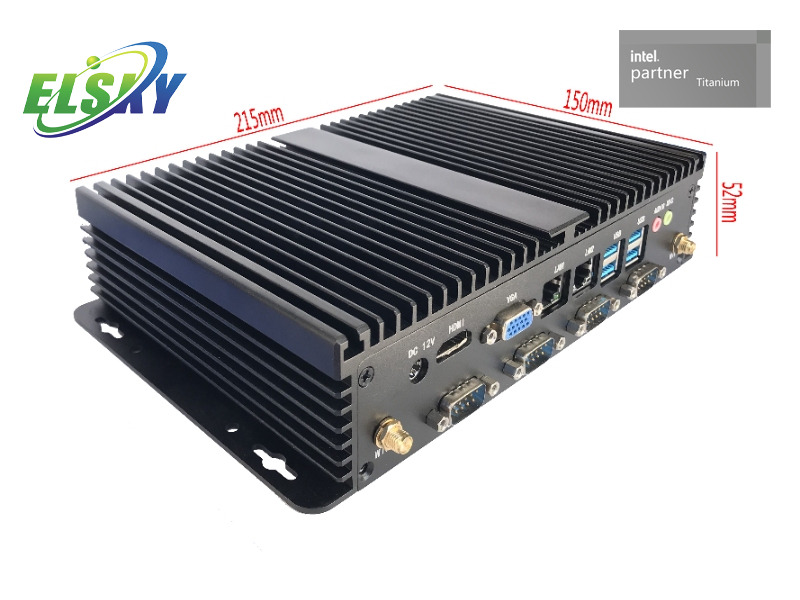
A true fanless mini PC relies on passive cooling. The chassis itself acts as a massive heatsink. Manufacturers extrude it from heavy aluminum. Internal heat pipes transfer thermal energy away from the CPU directly into this casing. The casing then dissipates heat into the surrounding air. This eliminates cooling fans. Fans pull conductive dust inside, causing fatal short circuits. Passive cooling creates a trade-off. It restricts peak CPU Thermal Design Power (TDP) limits. You cannot run a 100W gaming processor in a sealed box.
Match your hardware to the ambient environment. Ingress Protection (IP) ratings dictate survival rates. General factory floors usually require IP50 ratings to block large dust particles. Washdown areas in food and beverage plants demand much more. They require IP65 or IP67 ratings to survive direct high-pressure water jets.
Industrial machines vibrate constantly. Consumer computers shake themselves apart under these conditions. Look for hardware boasting MIL-STD-810G compliance. This military standard verifies survival under extreme mechanical shock. Manufacturers achieve this by removing internal cables. Cable-less designs solder components directly to the mainboard. You should prefer soldered RAM and storage modules over socketed versions. Sockets eventually vibrate loose.
Commercial hardware operates between 0°C and 40°C. Industrial settings easily exceed these boundaries. You need wide-temp ratings spanning -20°C to 70°C. Do not just trust a datasheet. Verify these claims. Ask vendors for independent thermal testing reports. Ensure they test the system under full CPU and GPU load at 70°C ambient.
Engineers often over-specify processors. This creates unnecessary thermal challenges. You should align your CPU architecture directly with your actual edge workload.
Different tasks require vastly different compute profiles. Identify your primary software application early.
Data Logging & Gateway Routing: These tasks require very little processing power. Intel Atom, Celeron, or N-Series processors handle them perfectly. They offer high efficiency and generate minimal heat.
Edge AI & Machine Vision: These applications demand heavy computation. You will need Intel Core i5/i7 or AMD Ryzen Embedded processors. Some advanced visual inspections require dedicated AI accelerators. Ensure your chassis includes internal PCIe expansion slots for these cards.
Never deploy cheap consumer SSDs in a factory. They corrupt data silently when exposed to sudden power loss. Always specify industrial-grade solid-state drives. Single-Level Cell (SLC) NAND provides the highest endurance. High-endurance Triple-Level Cell (TLC) offers a good middle ground. Pair this storage with wide-temp RAM. This combination prevents random blue screens during extreme temperature shifts.
Factory power grids fluctuate constantly. Starting a heavy motor causes voltage sags on the same circuit. Your hardware needs wide-voltage DC inputs to survive. An input range of 9V to 36V is standard for industrial equipment. The internal power supply must also feature overvoltage protection. Reverse polarity protection is equally crucial. It saves the motherboard if a technician wires the DC terminal block backward.
Hardware specifications only tell half the story. The company building the machine dictates your long-term success. You must evaluate the vendor just as rigorously as their product.
Assess the manufacturer's supply chain control. You need complete component traceability. Reputable vendors can tell you exactly which batches of capacitors went into your specific unit. This transparency proves crucial during a potential recall or failure investigation.
Consumer motherboards phase out rapidly. Manufacturers discontinue them every 18 months. This forces you to rewrite custom software continuously. Industrial boards differ entirely. Vendors build them using embedded silicon roadmaps. They guarantee identical form, fit, and function for 7 to 15 years. This longevity is mandatory for standardized image deployment across multiple factory locations.
Regulatory marks are not optional. You must verify mandatory safety and emission compliance. Check for legitimate CE, FCC, and RoHS certificates. Verify industry-specific certifications as well. If you deploy in railway rolling stock, you need EN50155. If building panels for the North American market, require UL listings.
Never roll out a large deployment without a rigorous trial. Follow this structured PoC process:
Secure a Trial Unit: Request a fully configured evaluation unit from your shortlisted vendor.
Load Maximum Stress: Run synthetic stress tests pushing both CPU and GPU to 100% utilization.
Test Thermal Limits: Place the stressed unit inside a thermal chamber or a hot factory cabinet for 48 hours. Monitor for thermal throttling.
Validate Peripheral Handshakes: Connect your oldest, most stubborn PLC. Confirm the serial communication remains stable across continuous 24-hour polling cycles.
Choosing an industrial mini PC with COM ports fundamentally comes down to minimizing failure points at the network edge. Consumer hardware crumbles under the mechanical stress, electrical noise, and thermal loads of modern factory floors.
You must weigh multiple factors equally. Native hardware I/O provides software stability. Fanless thermal design ensures mechanical survival. Embedded lifecycle guarantees prevent future deployment headaches. Pure compute specifications matter, but they mean nothing if the machine shuts down from dust ingress.
Take action today. Audit your current factory floor I/O requirements. Contact our engineering support team for a dedicated hardware consultation. We will help you review product spec sheets and coordinate a Proof of Concept evaluation unit.
A: No. Consumer USB hubs fail rapidly in high-vibration and high-EMI environments. Furthermore, Windows OS frequently reassigns COM port numbers to USB devices upon unexpected reboots. This breaks automated SCADA software mappings instantly. Native serial ports lock their addresses permanently in the hardware BIOS.
A: Isolated COM ports use internal optical components to separate electrical circuits physically. This protects the core computer motherboard from dangerous voltage surges and ground loops. Heavy machinery often generates these electrical spikes. Non-isolated ports offer no protection, risking complete motherboard failure.
A: Fanless designs do restrict the use of massive 100W+ desktop CPUs due to passive thermal limits. However, modern embedded processors provide more than enough power. Advanced Intel TE-series processors deliver robust edge compute and machine vision acceleration within a very manageable 15W to 35W thermal envelope.
A: Reputable vendors design their industrial systems based on embedded technology roadmaps. This strategy guarantees identical hardware availability for 5 to 15 years. You avoid the hidden frustrations of constantly tweaking your master software image for new, unproven consumer hardware iterations.