Views: 0 Author: Site Editor Publish Time: 2026-10-12 Origin: Site
Deploying edge hardware in harsh environments carries zero margin for error. A single hardware failure directly translates to sudden operational downtime and lost revenue. You need systems built to survive these demanding conditions. While the IPC200U offers a highly reliable, compact footprint for industrial automation, buyers often misalign its technical specifications with their actual field requirements. They mistakenly assume laboratory testing standards apply to enclosed cabinets or extreme outdoor sites.
This mismatch inevitably causes unexpected system crashes right when you need processing performance the most. We detail the most common procurement pitfalls below. You will discover an evidence-based evaluation framework to guide your hardware purchasing decisions. By avoiding these traps, you ensure successful integration and secure long-term system reliability for your entire facility.
A true fanless industrial PC requires rigorous thermal evaluation based on your specific deployment environment, not just laboratory spec sheets.
Total Cost of Ownership (TCO)—factoring in Mean Time Between Failures (MTBF) and maintenance—must override initial unit price during evaluation.
Legacy I/O compatibility and industry-specific compliance certifications are non-negotiable prerequisites before moving to a Proof of Concept (PoC).
Executing a phased PoC is the only reliable way to validate software loads and thermal performance in real-world conditions.
Assuming standard operating temperatures apply to enclosed factory cabinets leads to rapid equipment degradation. Many buyers read a specification sheet and see a broad temperature range. They forget standard tests often happen in open air. Enclosed, unventilated spaces trap heat rapidly. Outdoor deployments introduce direct sunlight, which bakes the internal components. You must evaluate environments critically.
To evaluate a true fanless industrial PC accurately, you must validate its thermal design power (TDP). Look closely at the heat dissipation mechanisms. Passive cooling relies heavily on chassis design and internal heatsinks. If the processor generates more heat than the chassis dissipates, the CPU will throttle. Thermal throttling destroys processing performance and leads to system freezes.
You must define exact environmental parameters before contacting vendors. Guessing ambient ranges often results in under-specced hardware. Document the following variables for your deployment sites:
Ambient Temperature Ranges: Measure peak summer heat inside your unventilated cabinets.
Humidity Levels: Identify condensing versus non-condensing moisture risks.
Particulate Exposure: Determine required Ingress Protection (IP) ratings for dust and water resistance.
Vibration and Shock: Assess nearby heavy machinery that could cause micro-fractures in circuit boards.
Always apply a strict decision lens. An industrial computer must explicitly state its wide-temperature capabilities under full CPU load. Idle temperature ratings mean nothing on a factory floor. If a vendor cannot provide thermal performance charts at 100% processing load, find another vendor.
Many procurement teams focus heavily on processing power. They prioritize core counts and clock speeds. Unfortunately, they neglect the physical interfaces needed to connect with existing machinery. Factories do not run entirely on modern Ethernet protocols. You will frequently encounter legacy PLCs, aging sensors, and older robotics. You need specific ports to make these connections work.
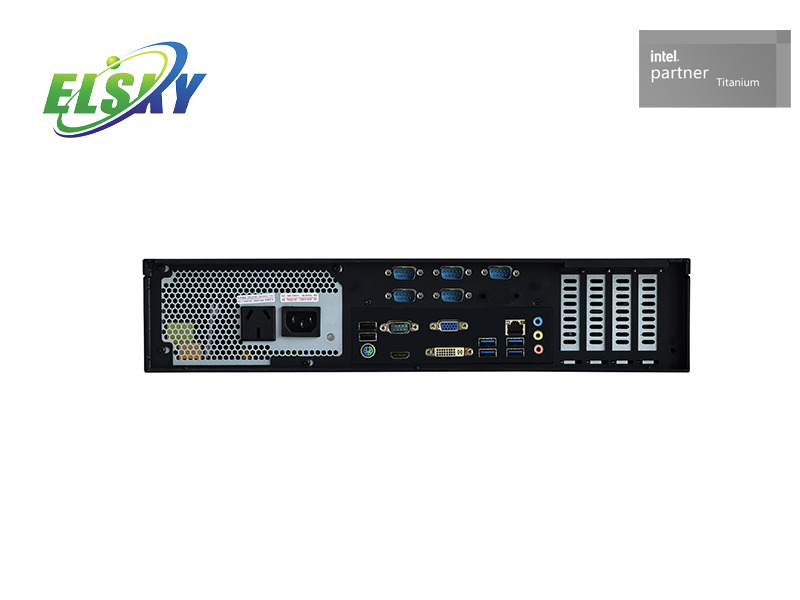
Audit your required port configurations prior to vendor selection. You cannot retrofit industrial connectivity easily. Map out the exact data acquisition architecture for your facility. Identify where data originates and how it travels to the edge gateway. You must ensure the compact form factor of the IPC200U accommodates your expansion needs natively.
Relying on third-party USB-to-Serial adapters introduces critical failure points. These adapters often lack industrial-grade soldering and easily disconnect under vibration. Furthermore, consumer-grade adapters frequently suffer from driver incompatibility during operating system updates. You should always demand native hardware ports.
Verify your requirements for RS-232/422/485 serial interfaces. Check if your sensors require isolated digital I/O to prevent voltage spikes from destroying the motherboard. Dual Gigabit LAN ports provide essential network redundancy and allow you to separate internal machine networks from outbound facility networks.
Prioritizing standard commercial procurement habits over lifecycle reliability guarantees premature hardware failures. Consumer electronics prioritize rapid iteration and aesthetic design. Ruggedized hardware prioritizes absolute stability and extended operational life. Approaching industrial computer sourcing with a consumer mindset creates devastating consequences for production lines.
You must shift your focus to expected longevity and Mean Time Between Failures (MTBF). Calculate the exact impact of potential downtime. A consumer PC might last two years before internal fans fail or motherboards crack from thermal stress. True industrial units utilize locked Bills of Materials (BOM). This means every internal resistor, capacitor, and memory chip remains identical for years.
Verify the manufacturer’s supply chain longevity before making a commitment. Ensure the internal components are guaranteed for long-term availability. Standard industrial lifecycles span five to seven years. This longevity avoids mid-cycle forced upgrades. When a manufacturer changes a motherboard chipset unexpectedly, you must rewrite software drivers and recertify the entire machine. Strict BOM locking prevents this disruption.
Hardware Evaluation Criteria Comparison
Feature Category |
Consumer-Grade Approach |
Industrial-Grade Approach |
|---|---|---|
Component Lifespan |
12 to 18 months (frequent changes) |
5 to 7 years (locked BOM) |
Cooling Mechanism |
Active fans (prone to dust failure) |
Passive heatsinks (sealed chassis) |
Vibration Tolerance |
Minimal (standard commercial testing) |
High (MIL-STD or equivalent testing) |
Operating Uptime |
8 to 12 hours daily |
24/7 continuous operation |
Procuring hardware that meets performance needs but fails regulatory audits creates major legal liabilities. A machine might run your software perfectly. However, if it lacks the required electromagnetic compatibility (EMC) ratings, inspectors will shut down your line. Different environments demand strictly regulated compliance standards.
You must identify mandatory regional and industry-specific certifications for your deployment zones. General CE and FCC marks only cover basic commercial safety. If you deploy near railways, you need EN 50155 certification for shock and vibration. Maritime deployments require specific IEC standards to survive salt fog and extreme humidity. Medical environments demand strict UL regulations regarding electrical leakage.
Request official certification documentation during the shortlisting phase. Do not accept marketing materials as proof of compliance. Many manufacturers use clever phrasing to bypass expensive testing procedures.
Never accept the phrase "designed to meet" in place of "certified to meet." "Designed to meet" simply means the engineers believe it would pass a test, but they never actually paid an independent laboratory to verify it. If compliance remains a strict legal requirement for your facility, only accept hardware with official laboratory certificates. This diligence protects your facility from severe regulatory fines.
Committing to a bulk rollout based purely on spec sheet evaluation invites disaster. Bench testing a unit in a climate-controlled office tells you nothing about its factory performance. Office environments lack the electrical noise, extreme temperatures, and heavy vibrations present on a production floor. You must validate the hardware in the real world.
Establish clear, measurable success metrics for a field trial. A simple power-on test does not qualify as validation. You need to stress the machine exactly as it will operate during peak production hours. This requires a formalized testing methodology.
Deploy a Single Unit: Mount the IPC200U exactly where the final units will reside (e.g., inside the actual factory cabinet).
Apply Maximum Load: Run your heaviest data processing software and push the CPU to 100% utilization.
Execute a 72-Hour Burn-In: Sustain this maximum load continuously for three full days without interruption.
Monitor Thermal Throttling: Record internal CPU temperatures. Verify the system maintains its base clock speed without throttling down to survive the heat.
Validate Network Consistency: Check system logs for dropped packets, serial port disconnects, or unexpected reboots.
Only after the device passes these rigid metrics should you authorize the final purchase order. A phased PoC remains the only reliable way to validate software loads and thermal performance.
Successful hardware procurement requires intense discipline and environmental awareness. You must align physical factory realities and legacy connectivity requirements with the exact capabilities of the hardware. Ignoring MTBF data or skipping certification checks creates fragile architectures prone to sudden failure. Prioritizing lifecycle longevity and system stability secures uninterrupted production.
Transition from passive research to active field validation today. Draft a strict technical requirements document detailing your thermal limits and I/O needs. Demand official certification documents from vendors. Finally, initiate a rigid Proof of Concept on the factory floor before finalizing any bulk hardware investment.
A: Review the manufacturer's testing methodology for wide-temperature ranges. Request MTBF data specific to the exact CPU load you intend to run. Demand thermal performance charts showing heat dissipation efficiency during 100% continuous processor utilization in enclosed environments.
A: It relies strictly on industrial-grade components designed to withstand severe shock, vibration, and wide temperature variations. It lacks moving parts like fans, which frequently act as the primary failure point in dusty or particulate-heavy factory environments.
A: Industrial applications require perfectly stable software images and identical hardware replacements over several years. A locked Bill of Materials prevents unexpected component changes. This avoids the massive downtime and expense of recertifying software on newly modified hardware configurations.
A: It depends strictly on your operational bottleneck. However, for most edge applications, securing reliable physical I/O connectivity to legacy factory machines remains much harder to retrofit than managing data with a slightly lower-tier CPU.